Right-aligned Mode Line Elements
Emacs users have long wanted the ability to push certain mode line elements to the right edge of the window. Think of it like having a left-aligned and right-aligned section in your mode line - buffer name on the left, maybe the time or some status info on the right.
Before Emacs 30, achieving this required various hacks involving padding calculations and propertized strings. It was doable, but fragile and ugly.
Emacs 30 makes it trivial with mode-line-format-right-align.
How it works
Just insert the symbol mode-line-format-right-align into your
mode-line-format. Everything before it is left-aligned (as usual), and
everything after it gets pushed to the right edge.
(setq-default mode-line-format
              '("%e" mode-line-front-space
                mode-line-mule-info
                mode-line-modified
                " "
                mode-line-buffer-identification
                mode-line-format-right-align
                mode-line-modes
                mode-line-misc-info
                mode-line-end-spaces))
In this example, the buffer identification stays on the left, while modes and miscellaneous info are pushed to the right.
Controlling the alignment edge
By default, right-aligned elements are pushed to the extreme right of the
window. You can control this with mode-line-right-align-edge:
;; Align to the left edge of the right fringe (default is 'window)
(setq mode-line-right-align-edge 'right-fringe)
The available values are:
| Value | Alignment point |
|---|---|
window |
Extreme right edge of the window (default) |
right-fringe |
Left edge of the right fringe |
right-margin |
Left edge of the right margin |
A practical example
Here’s a minimal setup that puts the buffer name and modification status on the left, and the current line/column and major mode on the right:
(setq-default mode-line-format
              '(" %+ "
                mode-line-buffer-identification
                mode-line-format-right-align
                mode-line-position
                " "
                mode-line-modes))
And here’s the result - the buffer name sits on the left while the position and major mode are pushed all the way to the right:
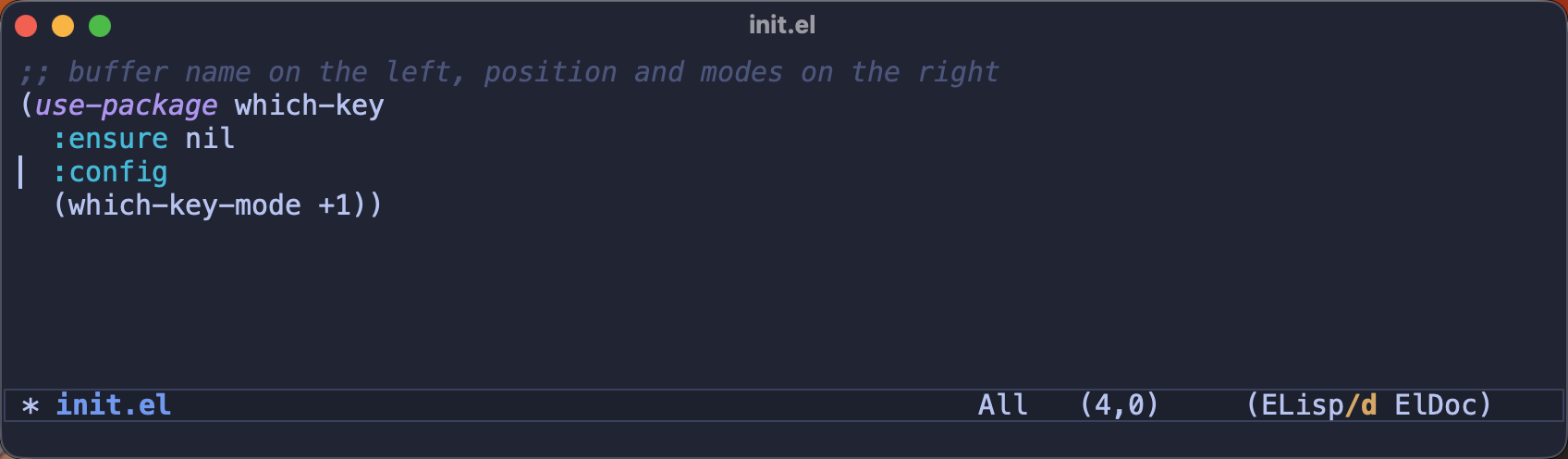
Clean, readable, and no hacks required.
For years I put up with a mode line that was either cluttered on the left or propped up with fragile padding hacks that broke the moment I resized a window. Having a proper right-aligned section built into Emacs feels almost too easy - the kind of small quality-of-life fix that makes you wonder what took so long.
What do you like to keep on the right side of your mode line - the time, the battery level, some VC info? I’d love to hear how you’ve arranged yours in the comments!
That’s all I have for you today. Keep your mode line in line!