Flymake Can Now Show Diagnostics at the End of the Line
If you’ve used modern editors like VS Code, you’ve probably noticed how they display error and warning messages inline, right at the end of the offending line. It’s a nice touch - you don’t have to hover over a squiggly underline or check a separate diagnostics buffer to see what’s wrong.
Emacs 30 brings this capability to Flymake with the new
flymake-show-diagnostics-at-end-of-line option.
Enabling it
(setq flymake-show-diagnostics-at-end-of-line t)
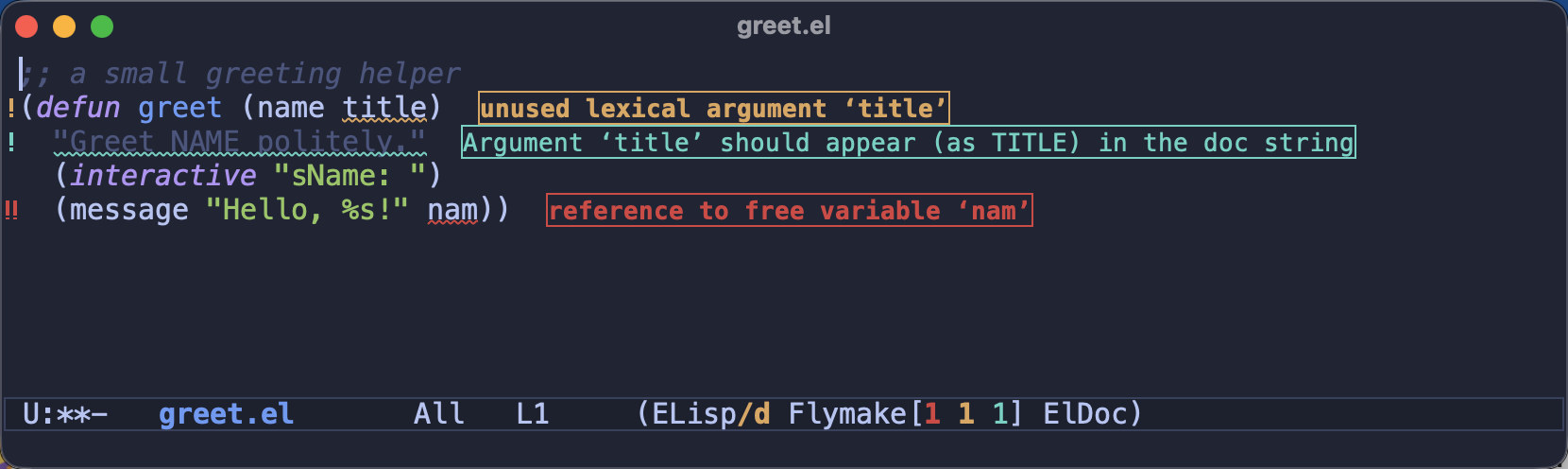
With this set, Flymake will display diagnostic summaries right at the end of each affected line, in addition to the usual fringe indicators and underlines. Here’s what it looks like in an Emacs Lisp buffer with a few issues (an error, a warning, and a checkdoc note):
Display options
The option accepts three values:
| Value | Behavior |
|---|---|
nil |
Don’t show inline diagnostics (default) |
short |
Show only the most severe diagnostic per line |
t |
Show all diagnostics for the line |
If a line has both a warning and an error, the short setting will only show the
error. Using t shows everything - which can get a bit noisy on lines with
multiple issues, but gives you the complete picture at a glance.
;; Only show the most important diagnostic per line
(setq flymake-show-diagnostics-at-end-of-line 'short)
Is this distracting?
Honestly, it depends on your taste. The Emacs documentation itself acknowledges the trade-off:
Depending on your preference, this can either be distracting and easily confused with actual code, or a significant early aid that relieves you from moving the buffer or reaching for the mouse to consult an error message.
I’d suggest trying it for a few days. If you find it too noisy, the short
setting is a good middle ground - you still get inline feedback, but limited to
the most severe issue on each line.
I was sure I’d hate this - text floating around in my buffer sounded like pure
clutter - but the short variant won me over surprisingly fast. Having the
message right there, without reaching for the mouse or popping open the
diagnostics buffer, is one of those small conveniences you stop noticing
precisely because it’s always quietly helping.
How do you like to consult your diagnostics - inline, in the fringe, or in a dedicated buffer? I’d love to hear your thoughts in the comments!
That’s all I have for you today. Keep those errors in plain sight!