which-key is Now Built-in
which-key is one of those packages I recommend to pretty much everyone -
newcomers and grizzled Emacs veterans alike. You start a key sequence like
C-x, pause for a moment, and it pops up a handy cheat sheet of every key that
can follow. I’ve had it in my config for ages, and I suspect a lot of you have
as well.
Here’s the good news - as of Emacs 30 you don’t need to install it anymore.
which-key is now a built-in package, so there’s one less thing to fetch
from MELPA when you set up Emacs on a fresh machine.
Enabling which-key
Being built-in doesn’t mean it’s enabled by default, though. You still have to turn it on explicitly:
(which-key-mode 1)
That’s the whole setup for most people. Now start any prefix key - C-x,
C-c, C-h - wait a moment, and a popup appears at the bottom of the frame
listing every binding under that prefix.
Here’s what I get when I press C-c p, the prefix for
projectile’s command map:
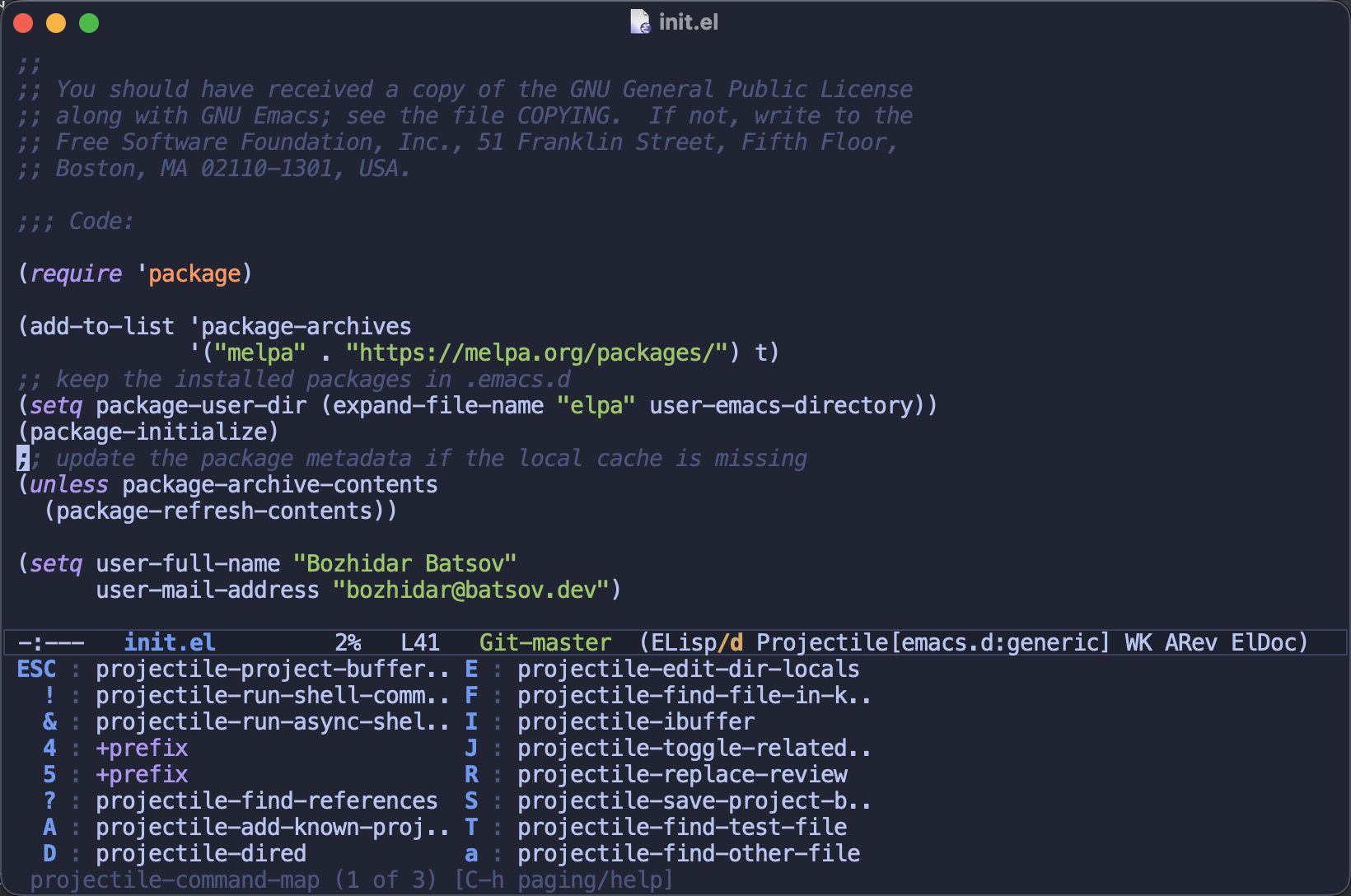
Instead of straining to remember whether it’s C-c p f or C-c p s s, I just
pause and Emacs reminds me. Projectile has a lot of commands, so which-key
even paginates them - notice the 1 of 3 in the bottom corner.
Configuration
The defaults are sensible, but here are the knobs I reach for most often:
;; show the popup faster (the default is a full second)
(setq which-key-idle-delay 0.5)

;; where the popup shows up
;; options: side-window (default), minibuffer, frame, custom
(setq which-key-popup-type 'side-window)

;; and where that side window sits
;; options: bottom (default), top, left, right
(setq which-key-side-window-location 'bottom)
I like a slightly snappier delay, but otherwise the stock configuration serves me just fine.
which-key and Transient
People sometimes ask me how which-key relates to
Transient - the menu library that powers
Magit’s famous popups. The two look superficially similar (both drop a bunch of
keys and descriptions at the bottom of your frame), but they solve rather
different problems.
which-key is a passive, automatic reminder. It doesn’t really know anything
about your commands - it simply reads whatever keymap you happen to be in and
shows you what’s there. You get it for free, across every prefix in Emacs, with
zero per-keymap work.
Transient is an interactive command builder. You design a transient deliberately, for a particular workflow, and unlike which-key it can hold state
- toggle switches on and off, accumulate arguments - before finally running a command with all of that baggage attached.
Projectile happens to ship both, which makes for a nice side-by-side. The
C-c p keymap you saw above is a plain keymap - which-key displays it and then
gets out of the way. But Projectile 3.0 also added projectile-dispatch (bound
to C-c p m), a Transient menu that mirrors the very same command map:
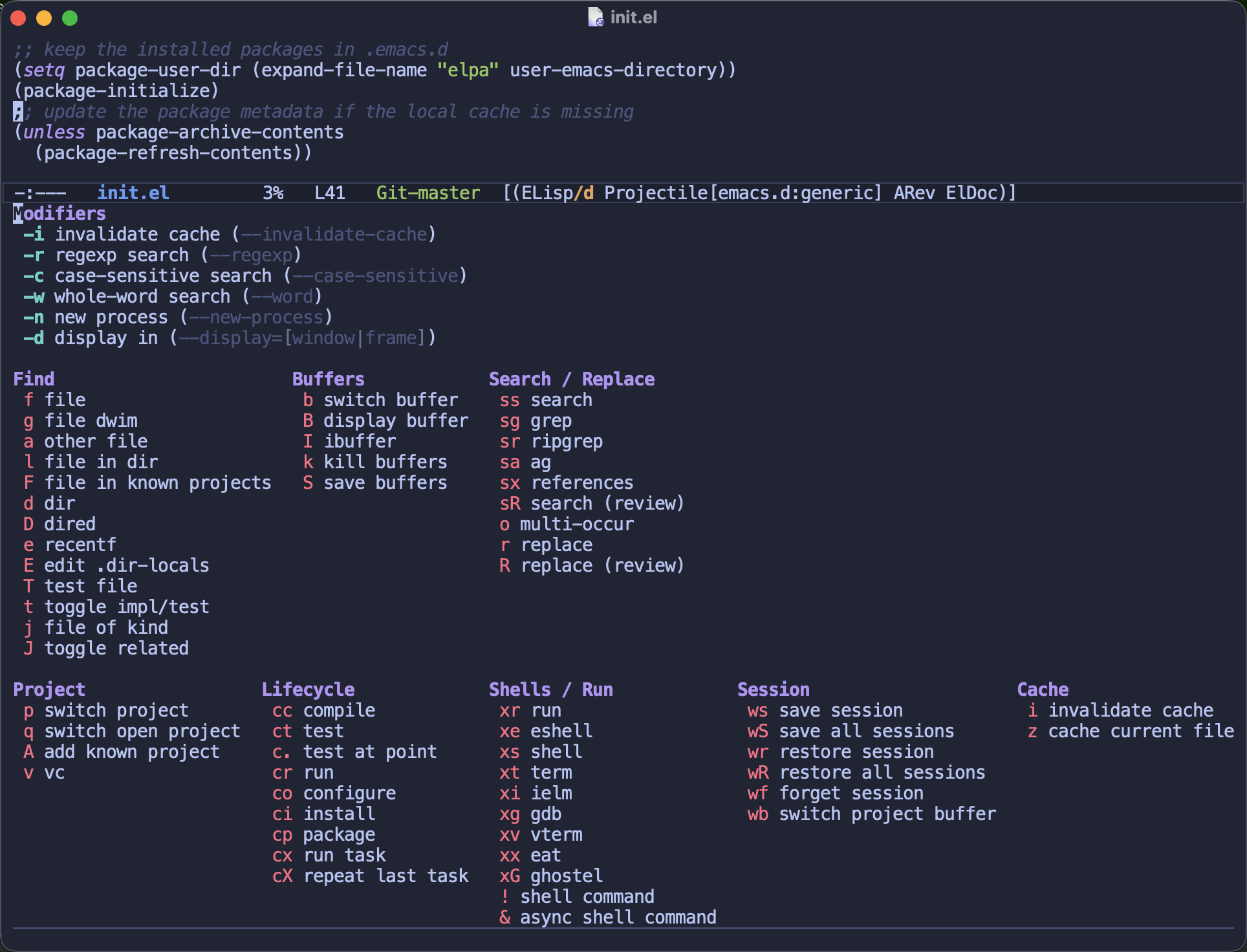
Notice the Modifiers section at the top - those are switches you flip before
picking a command. Want your next search to be case-sensitive, or your next
file lookup to invalidate the cache first? Toggle -c or -i, then press the
command key. That’s something a plain keymap (and therefore which-key) simply
can’t do.
So the way I see it - reach for which-key as an always-on safety net for the thousands of bindings scattered across Emacs, and reach for Transient when you’re building a polished, self-contained command center for a specific task. They’re complementary, and there’s no reason not to run both. In fact, if you use Magit or Projectile (or a dozen other modern packages), you’re already using Transient whether you realized it or not.
But wait, what about C-h?
Long-time Emacs users might point out that you’ve always been able to press
C-h after a prefix key to see the available bindings. That’s true! The
difference is that which-key does it automatically, no extra keypress
required - which makes it far more discoverable, especially for newcomers.
And the two don’t step on each other. C-h after a prefix still works and
gives you the traditional describe-bindings buffer, which you can scroll and
search to your heart’s content. Think of which-key as the quick glance and
C-h as the full reference.
Closing Thoughts
I’ve been a happy which-key user for years, and having it in the box means one
less package to install and keep updated. If you’ve somehow never tried it, do
yourself a favor and flip it on - it’s the kind of small quality-of-life feature
you stop noticing precisely because it’s always quietly helping you.
Do you keep which-key on all the time, or do you prefer to lean on C-h? And
have you started building your own Transient menus yet? I’d love to hear about
it in the comments.
That’s all I have for you today. Keep hacking (and let Emacs remember the keys for you)!