All Aboard Embark!
Yesterday I published a post about
Jinx, where I
mentioned in passing that dropping Flyspell freed up C-. and C-; for
embark, and that this would be a topic
for another article. Well, here it is!
Embark has been around for quite a few years, and pretty much everyone in the
vertico/consult crowd swears by it. Somehow I never got around to adopting
it until my recent config overhaul, and
now I keep asking myself why I waited so long.
So, What’s Embark?
Embark, written by Omar Antolín Camarena, is often described as a keyboard-driven
right-click menu for Emacs, and I think that’s a pretty apt description. You
point it at something - a minibuffer candidate, a file name, a URL, a symbol -
press C-. (embark-act) and you get a menu of actions that make sense for
that particular thing. A few examples:
- On a buffer in
C-x b? You can kill it, rename it, or diff it against its file without leaving the minibuffer. - On a file in
C-x C-f? You can delete it, rename it, copy its path, or open it in another window. - On a URL in a buffer? You can browse it or copy it.
- On an Elisp symbol? You can jump to its definition or look up its documentation.
The beauty of it is that you don’t have to abort the minibuffer session,
fiddle with dired or remember some obscure command name - the action comes to
you, right where you are.
Here’s the action menu you get when you press C-. with point on a URL:
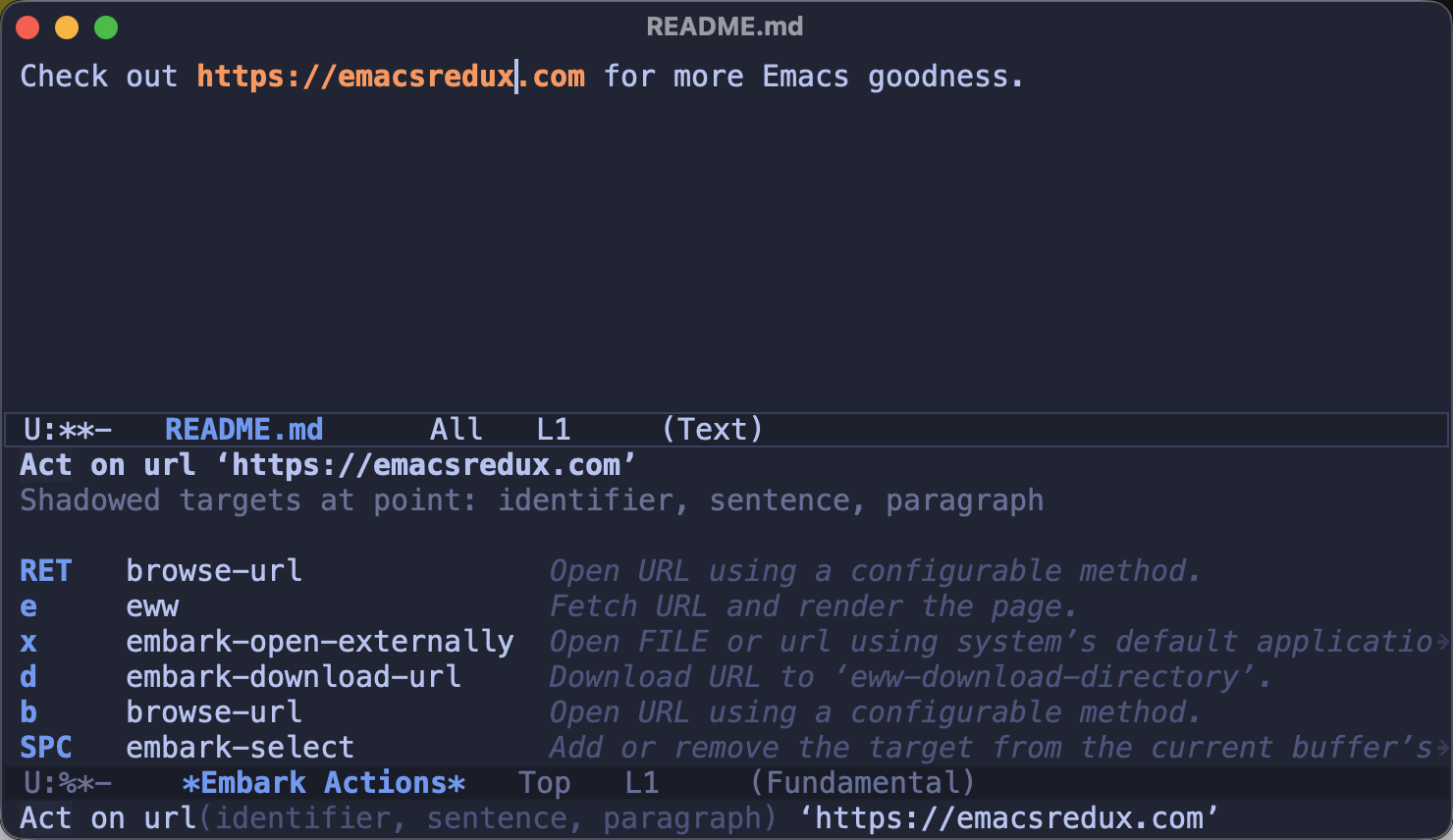
There’s also embark-dwim (C-; here), which skips the menu and runs the
default action directly - it opens the URL at point, visits the file at point
and so on. I find myself using it all the time for the common cases and
reaching for the full embark-act menu when I need something more exotic.
The Killer Feature: embark-export
Acting on a single thing is nice, but embark-export is where Embark really
shines. It takes the entire set of minibuffer candidates and dumps it into a
buffer of the appropriate major mode:
consult-ripgrep/consult-grepresults become agrep-modebufferconsult-lineresults become anoccurbuffer- file candidates become a
diredbuffer - buffer candidates become an
ibufferbuffer
You trigger the export from within the action menu - e.g. C-. E while in the
middle of a consult-ripgrep session.
In other words - you start a quick search in the minibuffer, and if it turns
out to be something bigger, you promote it to a proper buffer you can navigate,
save for later, or (my favorite) edit in place with
wgrep (C-c C-p in the exported
grep buffer) and apply the changes across all the matched files. Once this
workflow clicks, there’s no going back.
Tips and Tricks
A few more things I picked up in my first days with Embark that you’ll probably want to know about:
- Press
C-hright afterC-.to get a searchablecompleting-readmenu of every applicable action, and run the one you pick. This is both the best way to discover what Embark can do and a lifesaver when you’ve forgotten a key. C-. iinserts the current candidate in the buffer you came from andC-. wcopies it to the kill-ring. Sounds mundane, but grabbing a file path or a variable name from the minibuffer this way quickly becomes second nature.C-. A(embark-act-all) acts on all the candidates at once - think killing every buffer matching your current input in one go.C-. B(embark-become) replaces the current minibuffer command while keeping the input you’ve typed. StartedC-x C-f, but realized you actually needconsult-buffer? No need to abort and start over - just “become” the other command.- By default acting on a candidate exits the minibuffer. Call
embark-actwith a prefix argument (C-u C-.) to keep the session alive - handy when you want to, say, delete a few files in a row. (seeembark-quit-after-actionif you prefer to flip the default)
Embark Meets Projectile
Being the Projectile maintainer, I
obviously had to check how well Embark plays with it. The answer is - pretty
well, actually! Projectile advertises the completion category of its
candidates, and Embark knows how to resolve a project-relative path like
lisp/init-git.el to a full path before acting on it.1 This means the
whole file action arsenal works in projectile-find-file:
C-. w- copy the full path of a project file without visiting itC-. r- rename a file (nodireddetour needed)C-. d- delete a file you just realized shouldn’t existC-. j- jump to the file’s location indired
projectile-switch-project is even more fun, as there the candidates are the
project directories themselves:
C-. j- browse a project indiredwithout actually switching to itC-. $- openeshelldirectly in some project’s root (Embark is smart enough to run shell actions in the target’s directory)C-. w- copy a project’s pathC-. E- export the entire list of your known projects to adiredbuffer
That last one makes for a pretty nice project dashboard, if you ask me.
You can also teach embark-become about Projectile. Out of the box its
file/buffer map offers p for the built-in project-find-file, but we can
easily add a Projectile equivalent:
(with-eval-after-load 'embark
  (keymap-set embark-become-file+buffer-map "P" #'projectile-find-file))
Now when you start a plain C-x C-f and realize the file is somewhere deep in
the current project, C-. B P will re-run your input through
projectile-find-file instead. No retyping needed.
Note: One small asymmetry - C-. E in projectile-find-file currently
produces an Embark collect buffer rather than a dired buffer, as the
exporters operate on the raw completion category. Still useful (you can keep
acting on the candidates from there), just don’t expect wdired magic.
Note: The exporters for the various consult commands live in the
embark-consult package, so you’ll want that one too if you’re a consult
user.
The Setup
Here’s the relevant bit of my config:
(use-package embark
  :ensure t
  :bind (("C-." . embark-act)
         ("C-;" . embark-dwim)
         ("C-h B" . embark-bindings))
  :init
  (setq prefix-help-command #'embark-prefix-help-command))

(use-package embark-consult
  :ensure t
  :hook (embark-collect-mode . consult-preview-at-point-mode))
C-. and C-; are the bindings suggested by Embark’s README and they are
quite comfortable, provided nothing else is squatting on them.2 The
prefix-help-command bit is a small gem on its own - press C-h after any
prefix (say C-x) and instead of the regular help buffer you get a
completing-read over all the bindings in it, which you can narrow and execute
directly.
Embark doesn’t really care which minibuffer completion UI you’re using - it
works fine with vertico, icomplete and even the default completion setup.
Closing Thoughts
Embark is one of those packages that are a bit hard to explain, but make total
sense the moment you try them - the “aha” moment for me came the first time I
exported a consult-ripgrep session. It has certainly earned its place in the
small set of packages I’d install on day one.
Are you using Embark already? What are your favorite actions? I’d love to hear about them in the comments!
That’s all I have for you today. Keep acting (on all the things)!
-
Under the hood the path resolution goes through
project.el, so this works in any VC-backed project - which covers pretty much every Projectile project out there. ↩ -
In my case Flyspell was hogging both of them, which is partially what prompted its replacement. ↩