CIDER and Projectile Meet Embark
Embark is one of those packages that
quietly rewires how you use Emacs. Think of it as a context-aware right-click:
you invoke embark-act (I keep it on C-.) on whatever’s at point - a file
name, a symbol, a URL - and Embark offers a menu of things you can do with it.
The neat part is that it’s completely extensible, so you can teach it about new
kinds of targets. Lately two of my projects, CIDER and Projectile, have grown
Embark integrations, in slightly different ways, and both are worth a look.
Let’s start with CIDER, and teach Embark about Clojure symbols, so embark-act
on one offers a bunch
of CIDER commands:
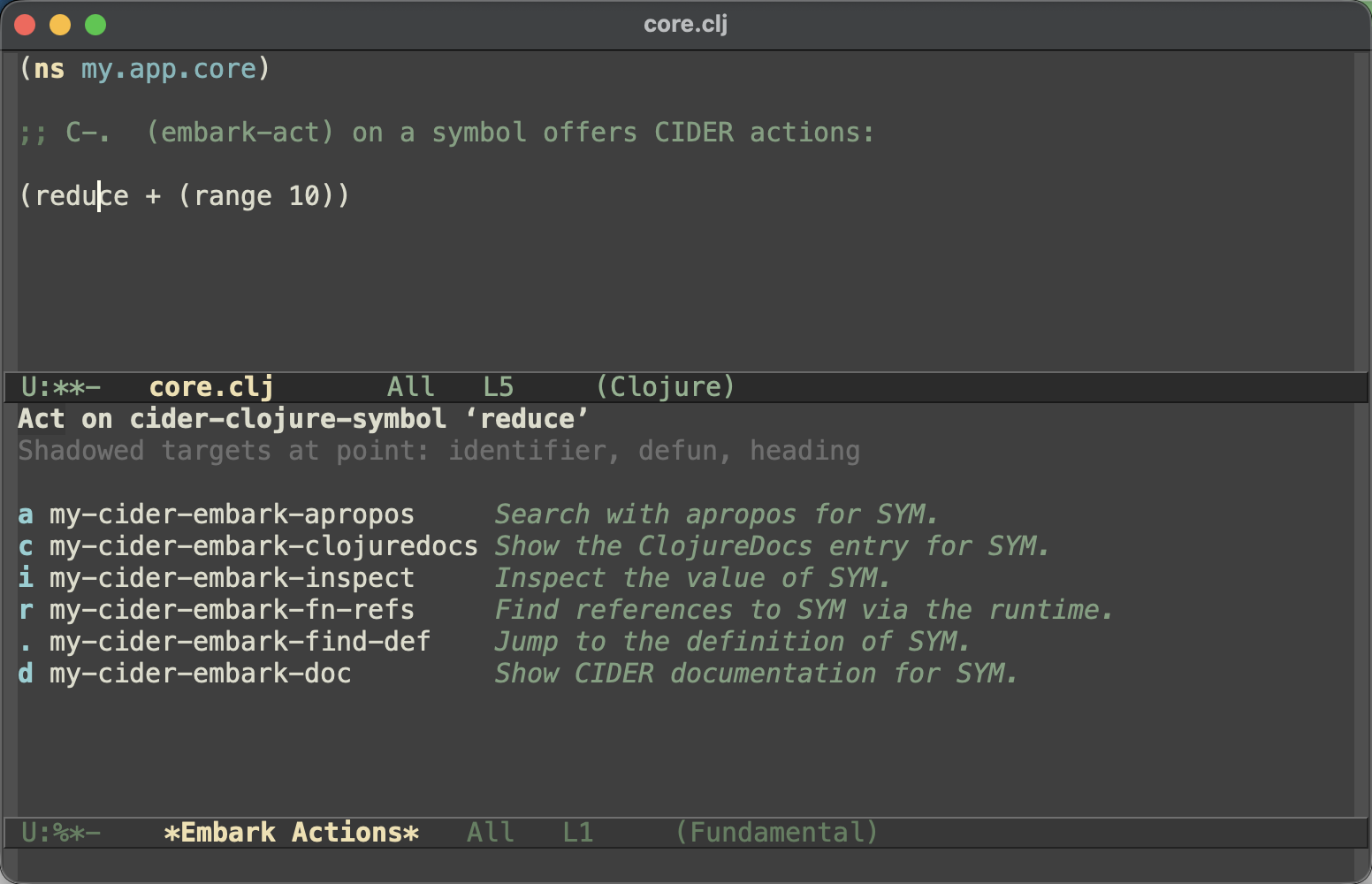
So d shows the documentation, . jumps to the definition, r finds
references, i inspects the value, c opens ClojureDocs and a runs apropos -
the usual CIDER commands, a keystroke away from wherever your cursor happens to
be.
Here’s the setup. It’s a handful of little wrappers around the CIDER commands, a keymap that binds them, a target finder that spots a Clojure symbol at point, and the bit of wiring that ties it all together:
(defun my-cider-embark-doc (sym)
  (interactive "sClojure symbol: ")
  (cider-doc-lookup sym))

(defun my-cider-embark-find-def (sym)
  (interactive "sClojure symbol: ")
  (cider-find-var nil sym))

(defun my-cider-embark-fn-refs (sym)
  (interactive "sClojure symbol: ")
  (cider-xref-fn-refs nil sym))

(defun my-cider-embark-inspect (sym)
  (interactive "sClojure symbol: ")
  (cider-inspect-expr sym (cider-current-ns)))

(defun my-cider-embark-clojuredocs (sym)
  (interactive "sClojure symbol: ")
  (cider-clojuredocs-lookup sym))

(defun my-cider-embark-apropos (sym)
  (interactive "sClojure symbol: ")
  (cider-apropos sym))

(defvar my-cider-embark-symbol-map
  (let ((map (make-sparse-keymap)))
    (define-key map "d" #'my-cider-embark-doc)
    (define-key map "." #'my-cider-embark-find-def)
    (define-key map "r" #'my-cider-embark-fn-refs)
    (define-key map "i" #'my-cider-embark-inspect)
    (define-key map "c" #'my-cider-embark-clojuredocs)
    (define-key map "a" #'my-cider-embark-apropos)
    map))

(defun my-cider-embark-target ()
  (when (derived-mode-p 'clojure-mode 'clojurescript-mode 'clojurec-mode
                        'clojure-ts-mode 'cider-repl-mode)
    (when-let* ((bounds (bounds-of-thing-at-point 'symbol))
                (sym (cider-symbol-at-point)))
      (unless (string-empty-p sym)
        `(cider-clojure-symbol ,sym . ,bounds)))))

(with-eval-after-load 'embark
  (add-to-list 'embark-target-finders #'my-cider-embark-target)
  (add-to-list 'embark-keymap-alist '(cider-clojure-symbol my-cider-embark-symbol-map))
  (add-to-list 'embark-keymap-alist '(cider my-cider-embark-symbol-map)))
That last cider line is my favorite bit. CIDER’s symbol prompts (things like
cider-doc and cider-find-var) can read through completing-read and tag
their candidates with the cider completion category, so pointing that category
at the same keymap means embark-act works on the candidates too. You start
typing a symbol to read its docs, spot it in the candidate list, decide you’d
rather jump to its definition - C-. . and you’re there, no retyping. Symbols
in your code and candidates in the minibuffer end up sharing one set of actions.
Projectile took the opposite tack and ships its Embark integration out of the
box - there’s nothing to configure, it wires itself up as soon as Embark is
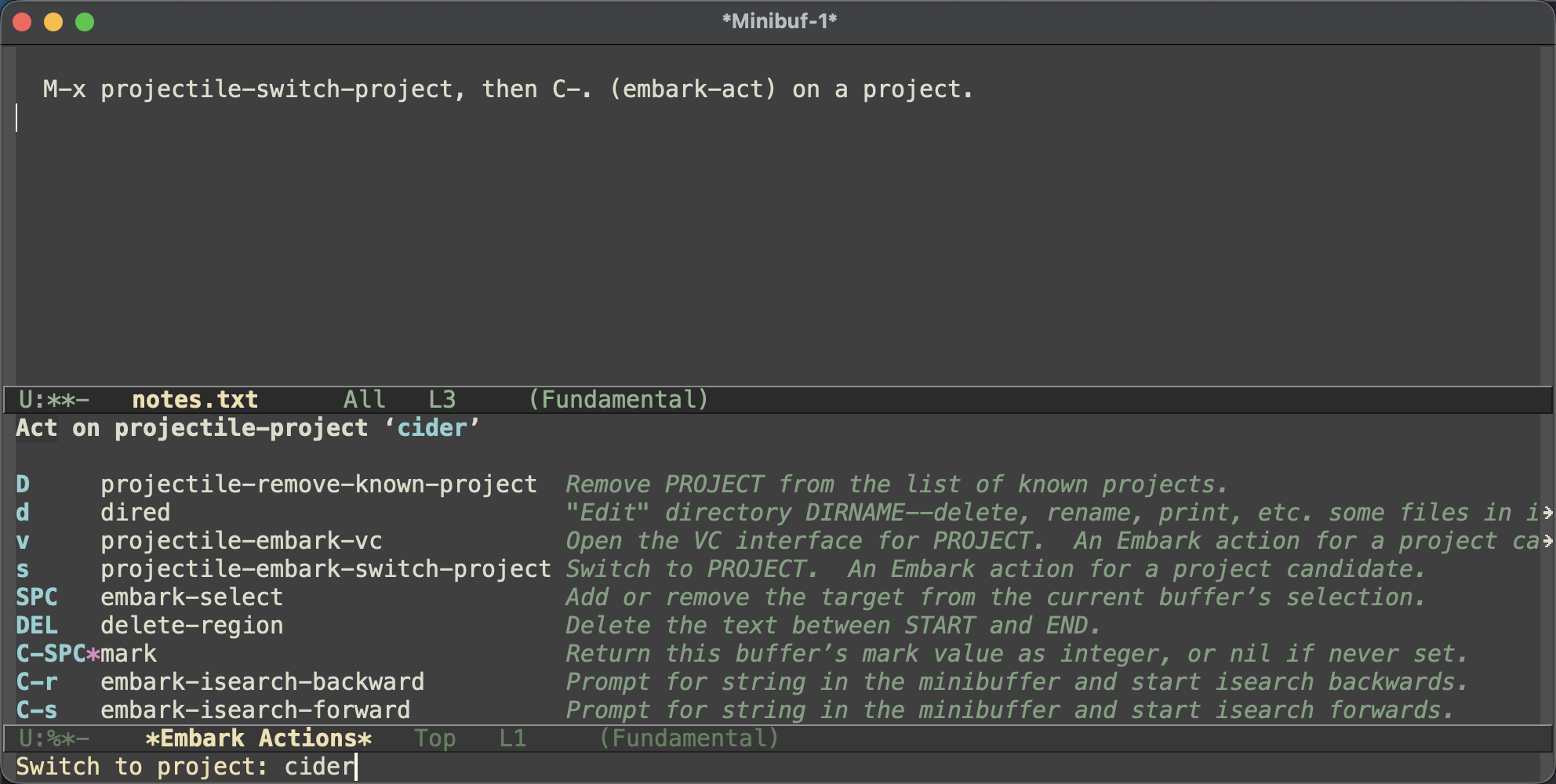
loaded. Two things happen. Acting on a project candidate (say, in
projectile-switch-project) gives you project-specific actions - switch to it,
open its VC interface, drop into dired, or remove it from the known-projects
list - instead of the generic file actions you’d otherwise get:
And when you act on a project file candidate, Projectile makes sure the path
resolves against the project root, so Embark’s file actions land on the right
file no matter what your default-directory happens to be.
You might wonder why Projectile ships this while CIDER leaves it to you. It comes down to what each integration is. Projectile’s is mostly about making the completion categories it already exposes behave correctly under Embark, plus a small and fairly obvious set of project actions - there isn’t much to bikeshed there. CIDER’s symbol actions are a bigger, more personal grab-bag: which commands you want on that menu, and which keys you put them on, is very much a matter of taste. A recipe you copy and tailor felt like the better fit. Same idea, two problems that wanted different answers.
That’s all I have for you today. Keep hacking!
P.S. If you’re not using Embark yet, the actions above are just the start -
once you start thinking of embark-act as “do something with the thing at
point”, it’s hard to stop.