Meet Utterson, my Jekyll blogging helper
Back in 2019 I wrote about dealing with Jekyll post URLs, where I shared a tiny command that spared me from having to remember the exact file name of every article I wanted to link to. That command has been in my config ever since, and over the years it quietly grew a few siblings. Recently I finally gathered them all in one place and turned them into a small package - utterson.
The common Jekyll tasks
I guess anyone who blogs with Jekyll knows the drill. Jekyll is great and I have no intention of switching, but a few of its conventions generate a steady trickle of manual work:
- posts live in
_postsand their file names have to start with the publication date, as in2026-08-26-some-post.md - every article needs a bit of YAML front matter at the top - a layout, a title, a date, some tags
- linking to another post means using a Liquid tag that wants that date-prefixed file name, which nobody remembers
- images and other assets need URLs relative to the site root, not to the article you happen to be editing
None of this is hard. All of it is annoying, and all of it is exactly the sort of
mechanical work an editor should be doing on your behalf. So over the years I
wrote a command for each chore, dropped it in my init.el and moved on with my
life.
Why I finally cleaned this up
The tipping point was the last command I added - promoting a draft to a post.
I write most articles in _drafts, where jekyll serve --drafts shows them but a
deploy doesn’t. Publishing one used to mean renaming the file by hand to add
today’s date, then editing the date in the front matter to match, then
convincing git that this was a rename rather than a delete plus a brand new file.
Three chances to get something wrong, and I certainly got it wrong more than once.
Once that was automated I took a look at what had accumulated in my config and realized it wasn’t a bag of snippets anymore - it was a workflow. And since every person blogging with Jekyll from Emacs deals with exactly the same chores, there was no good reason to keep it to myself. So I spent an evening extracting the lot, wrote some tests, and gave it a name.1
There are other Jekyll packages for Emacs, of course. Both hyde and easy-jekyll aim to be something like an IDE for your site, with dashboards, deployment and preview buffers. That’s a perfectly reasonable thing to want, it’s just never been what I wanted. My site lives in git, I deploy it with a push, and I’ve already got Magit and a browser. All I ever wanted was for the bookkeeping to stop being my problem.
So utterson is deliberately small. It knows that a Jekyll site is a folder of
Markdown files with YAML front matter, and that’s about the extent of its
ambitions. Renames go through vc, so git records them as renames and the history
of an article follows it around. Nothing in there ever deploys anything.
Taking it for a spin
The package is not on MELPA (yet?), so for the time being it’s package-vc
territory:
(use-package utterson
  :vc (:url "https://github.com/bbatsov/utterson" :rev :newest)
  :custom
  ;; where to look for sites, when you invoke a command outside one
  (utterson-search-path '("~/projects/"))
  :config
  ;; the commands live in a keymap that you bind wherever you please
  (keymap-set utterson-mode-map "C-c j" 'utterson-command-map)
  (global-utterson-mode +1))
global-utterson-mode enables the minor mode in the buffers of any folder that
has a _config.yml in it, so the commands are around while you’re working on a
site and nowhere else.
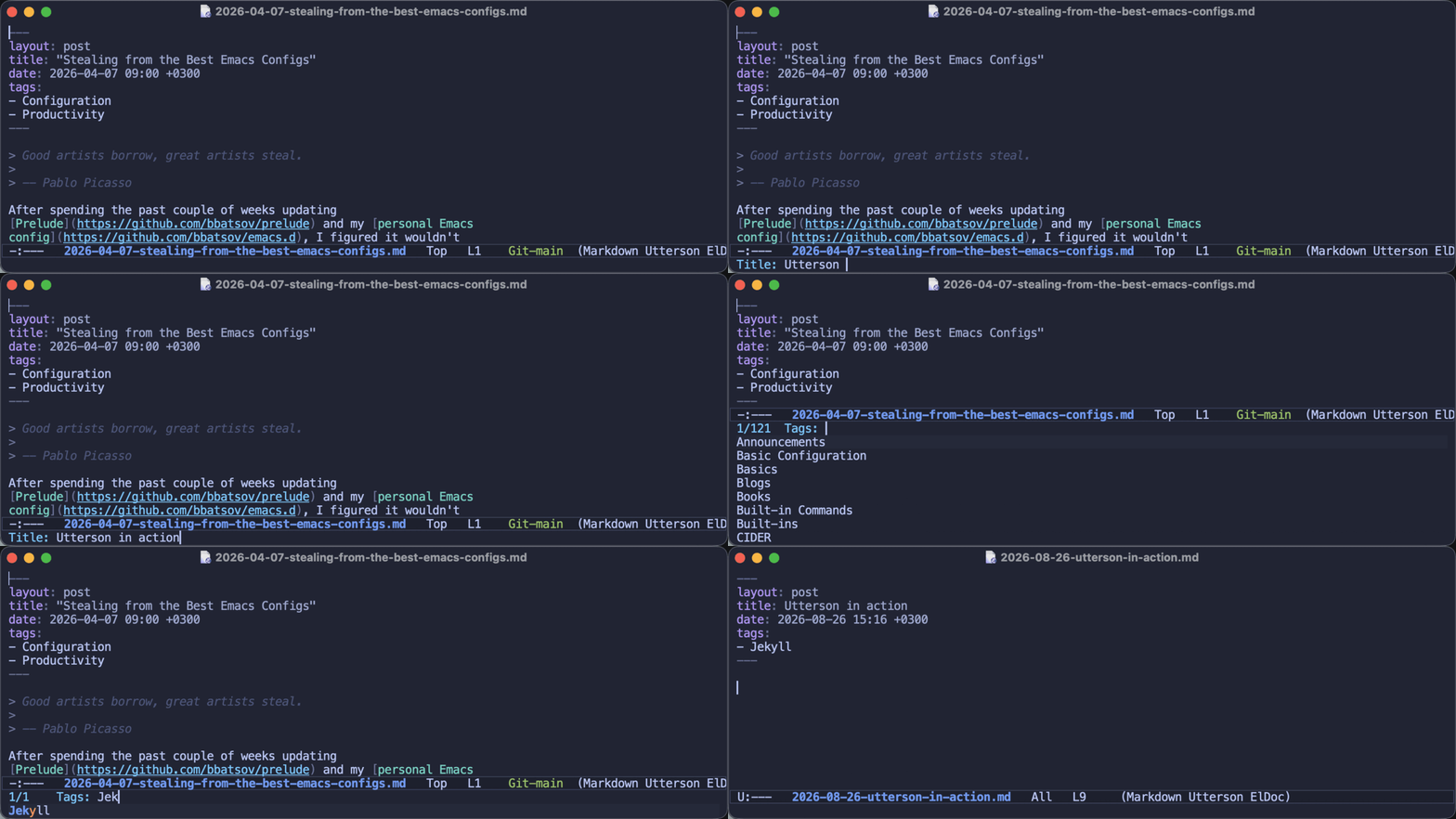
C-c j p starts a post. It asks for a title, offers a file name slug derived from
it (which you’re free to shorten right there, and I usually do), then asks for
tags, completing against every tag the site already uses. That last bit is how you
avoid ending up with both Emacs and emacs in your tag cloud. Finally it writes
the front matter, saves the file and leaves the cursor exactly where you’re about
to start writing:
---
layout: post
title: Meet Utterson, my Jekyll blogging helper
date: 2026-08-26 15:01 +0300
tags:
- Jekyll
- Blogs
- Packages
---
That block, as it happens, is the one this very article started with. Here’s the whole thing in action:
C-c j d does the same in _drafts and C-c j t moves an article between the
two, dating it on the way in and staging the rename with git. C-c j r is for the
article you wrote a couple of weeks ago and never got around to publishing - it
sets the date to now and renames the file to match. Both of them take a prefix
argument if you’d rather type a date than accept the current time, which is how
you schedule something for next Monday morning.
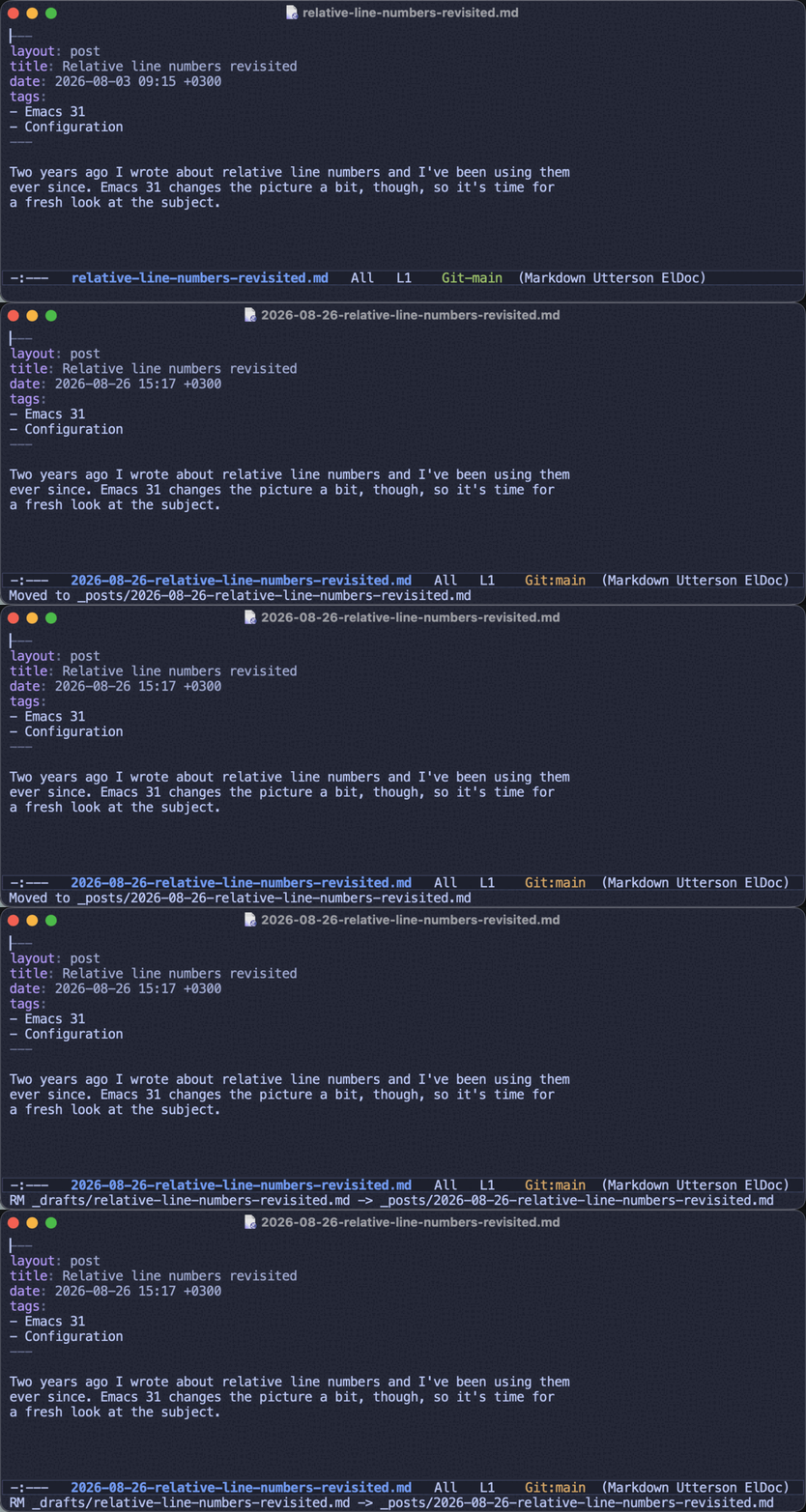
Publishing a draft looks like this - notice that the file name, the date in the
front matter and git’s idea of what happened all stay in sync:
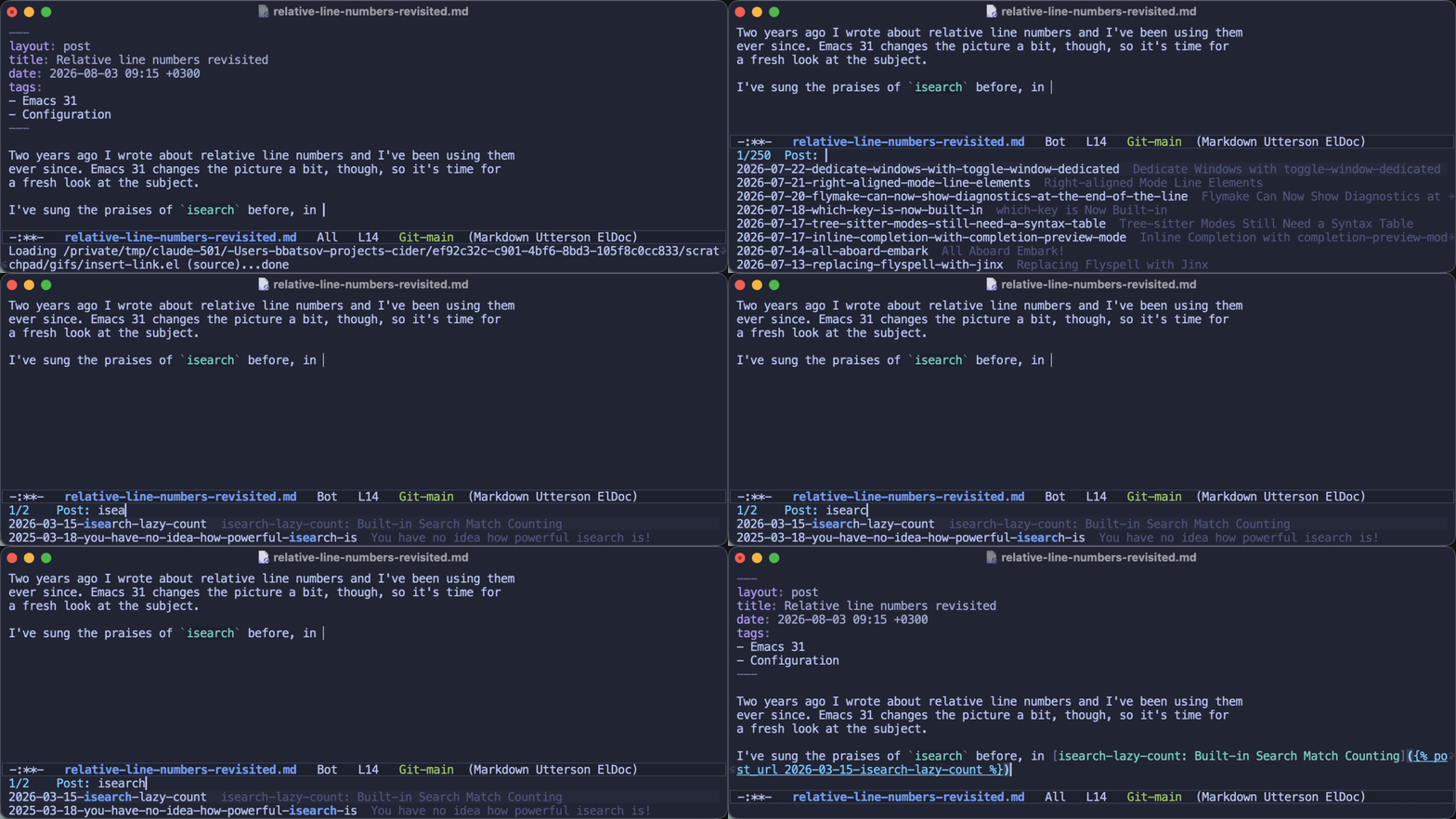
The linking commands are the descendants of that 2019 snippet, all grown up.
C-c j u inserts a post_url tag, completing over your posts newest first and
showing you each post’s title next to its file name, and C-c j l inserts the
entire Markdown link, already titled after the post it points to:
C-c j i
inserts an image, C-c j I copies a file into your images folder first (perfect
for a screenshot that’s still sitting on your desktop under a name like
Screenshot 2026-08-26 at 15.01.12.png), and C-c j a links to anything else
under assets. And C-c j s runs jekyll serve in a buffer, because sooner or
later you do want to look at the thing.
Note: There’s a menu as well, in case you’d rather click your way around while the keybindings are still settling in.
Epilogue
It’s early days for the package, even though most of the code behind it has been in daily use for years. If you blog with Jekyll from Emacs, I’d love to hear which of your own little chores it doesn’t cover yet - that’s the fastest way for it to get better.
And if you don’t blog with Jekyll - what does your setup look like? I’ve got the
feeling that quite a few of you are writing your posts in org-mode and I’m
always curious about the workflows people come up with.
That’s all I have for you today! Keep hacking!
-
Gabriel John Utterson is Doctor Jekyll’s loyal friend and lawyer - the man who keeps his affairs in order. Naming things is hard, but every now and then you get lucky. ↩